Audit Logs
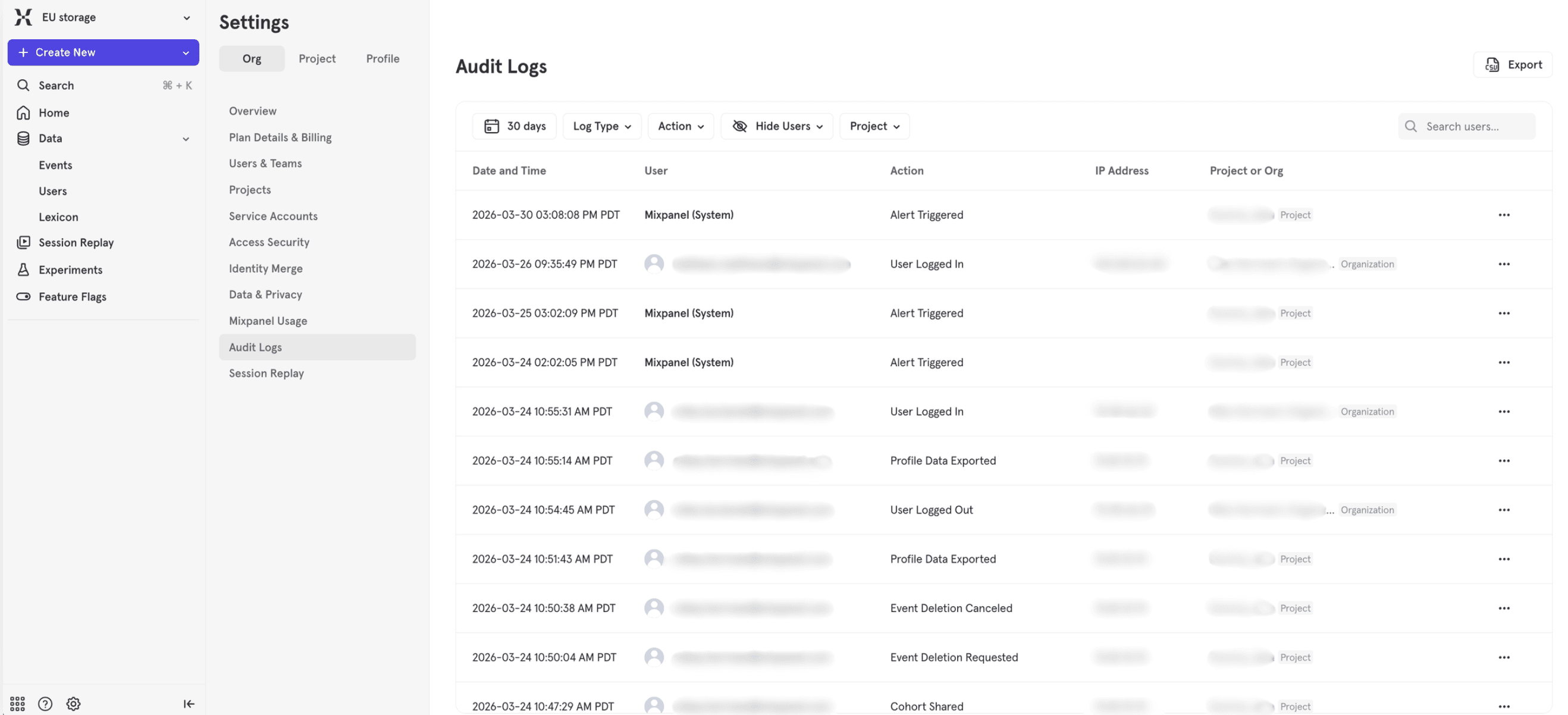
Mixpanel Audit Logs track activity within your organization and projects, providing visibility into who made changes, when they occurred, and what was modified. Audit logs help teams maintain security, troubleshoot issues, and meet compliance requirements.
Audit logs are available on all plans. Free and Growth plans retain logs for 90 days. Enterprise plans retain logs for 2 years. See our pricing page for more details.
Accessing Audit Logs
Audit logs can be accessed at two levels:
- Organization-level logs — Found in Organization Settings. Accessible to users with Admin or Owner roles in the organization.
- Project-level logs — Found in Project Settings. Accessible to users with Admin or Owner roles in the project.
Some events are tracked only at the organization level, while most are available in both organization and project logs.
- Navigate to Organization Settings or Project Settings by clicking the gear icon in the bottom left navigation > Settings.
- Select Audit Logs from the sidebar menu.
- View the activity log showing recent events, who performed them, and when they occurred.
Tracked Events
The current Audit logging contains only actions made within the Mixpanel UI. The logging for each set of events starts on the following dates:
- Alerts - 2026-01-31T00:00:00Z
- All Other logs - 2026-03-31T19:00:00Z
Mixpanel tracks the following events in your audit logs:
Alerts
| Event Type | Display Name | Description |
|---|---|---|
alert.created | Alert Created | A new alert was created on a report |
alert.deleted | Alert Deleted | An alert was removed |
alert.triggered | Alert Triggered | An alert condition was met and triggered |
alert.updated | Alert Modified | An existing alert’s settings were changed |
Boards
| Event Type | Display Name | Description |
|---|---|---|
board.created | Board Created | A new board was created |
board.deleted | Board Deleted | A board was permanently removed |
board.duplicated | Board Duplicated | A copy of an existing board was created |
board.exported | Board Exported | Board data was exported |
board.public_access_updated | Public Board Access Updated | Public sharing settings for a board were changed |
board.shared | Board Shared | A board was shared with users or teams |
board.unshared | Board Unshared | Sharing access to a board was revoked |
board.updated | Board Updated | Board settings or content were modified |
Board Subscriptions
| Event Type | Display Name | Description |
|---|---|---|
board_subscription.created | Board Subscription Created | A scheduled board email subscription was set up |
board_subscription.deleted | Board Subscription Deleted | A board subscription was removed |
Reports
| Event Type | Display Name | Description |
|---|---|---|
bookmark.created | Report Created | A new saved report was created |
bookmark.deleted | Report Deleted | A saved report was removed |
bookmark.updated | Report Updated | A saved report’s configuration was changed |
Cohorts
| Event Type | Display Name | Description |
|---|---|---|
cohort.created | Cohort Created | A new cohort was created |
cohort.deleted | Cohort Deleted | A cohort was permanently removed |
cohort.shared | Cohort Shared | A cohort was shared with users or teams |
cohort.unshared | Cohort Unshared | Sharing access to a cohort was revoked |
cohort.updated | Cohort Updated | Cohort criteria or settings were modified |
Custom Roles
| Event Type | Display Name | Description |
|---|---|---|
custom_role.created | Custom Role Created | A new custom role with specific permissions was created |
custom_role.deleted | Custom Role Deleted | A custom role was removed |
custom_role.updated | Custom Role Updated | Permissions or settings for a custom role were changed |
Data Pipelines
| Event Type | Display Name | Description |
|---|---|---|
data_pipeline.created | Data Pipeline Created | A new data pipeline integration was set up |
data_pipeline.deleted | Data Pipeline Deleted | A data pipeline was removed |
data_pipeline.updated | Data Pipeline Updated | Data pipeline configuration was modified |
Warehouse Sources
| Event Type | Display Name | Description |
|---|---|---|
warehouse_source.created | Warehouse Source Created | A new warehouse data source was connected |
warehouse_source.deleted | Warehouse Source Deleted | A warehouse source connection was removed |
warehouse_source.updated | Warehouse Source Updated | Warehouse source configuration was changed |
Data Management
| Event Type | Display Name | Description |
|---|---|---|
event_deletion.canceled | Event Deletion Canceled | A pending event deletion request was canceled |
event_deletion.created | Event Deletion Requested | A request to delete events was submitted |
user_data_deletion.canceled | User Data Deletion Canceled | A pending user data deletion request was canceled |
user_data_deletion.created | User Data Deletion Requested | A request to delete user profile data was submitted |
Data Exports
| Event Type | Display Name | Description |
|---|---|---|
audit_log_export.created | Audit Log Export Created | An audit log export was initiated |
audit_log_export.downloaded | Audit Log Export Downloaded | An audit log export file was downloaded |
event_export.downloaded | Events Exported | Event data was exported from the project |
profile_export.downloaded | Profile Data Exported | User profile data was exported |
user_data_export.created | User Data Export Requested | A user data export request was submitted |
Service Accounts
| Event Type | Display Name | Description | Scope |
|---|---|---|---|
service_account.created | Service Account Created | A new service account was created | Organization only |
service_account.deleted | Service Account Deleted | A service account was removed | Organization only |
service_account.added_to_project | Service Account Added to Project | A service account was granted access to a project | Both |
service_account.removed_from_project | Service Account Removed from Project | A service account’s project access was revoked | Both |
service_account.role_changed | Service Account Role Changed | A service account’s role or permissions were modified | Both |
User Authentication
| Event Type | Display Name | Description | Scope |
|---|---|---|---|
session.logged_in | User Logged In | A user successfully logged into the organization | Organization only |
session.logged_out | User Logged Out | A user logged out of the organization | Organization only |
user.twofactor_enabled | User Enabled Two-Factor Auth | A user activated two-factor authentication | Organization only |
Exporting Audit Logs
You can export your audit logs to CSV format for further analysis or archival purposes.
- Navigate to the audit logs page in Organization Settings or Project Settings.
- Click the CSV Export button to download the current view of audit logs.
- The export includes all visible events within your retention period.
Limitations
- Retention periods vary by plan:
- Free & Growth plans: 90 days
- Enterprise plans: 2 years
- Organization-only events (service account management, login/logout, two-factor auth) are only visible in Organization Settings, not Project Settings.
- Audit logs are read-only and cannot be modified or deleted.
FAQ
Who can access audit logs?
Only users with Admin or Owner roles in an organization or project can view audit logs for that organization or project.
Can I filter audit logs by event type or user?
Yes, the audit logs interface provides filtering options to help you find specific events or actions by particular users.
How long does it take for events to appear in the audit log?
Events typically appear in the audit log within a few minutes of the action occurring.
What’s the difference between organization and project audit logs?
Most events appear in both places. Organization audit logs contain additional organization-wide events like user authentication and service account creation. Project audit logs track project-specific events like report creation and data exports. The tables with a scope field say which audit log will contain the event. If there is not scope column in a table, the event should show up in both Organization and Project audit logs.
Was this page useful?